

Whether you’re an employee, an employer, or self-employed, you’ve probably heard the term “pay stub” or “check stub.” But what does it really mean — and how does it work? In this guide, we’ll break down what a pay stub is, how it looks, and how you can easily create paycheck stubs online using a pay stub generator like PhcWorkHub.
🧾 What’s the Meaning of a Pay Stub?
A pay stub (also called a check stub or paycheck stub) is a document that shows the details of an employee’s earnings and deductions for a specific pay period.
In simple terms:
A pay stub is proof of income — it tells you how much you earned, what was withheld (like taxes or insurance), and how much you actually take home.
Employers usually issue pay stubs along with paychecks, while many businesses and freelancers now use online pay stub generators to create digital versions instantly.
⚙️ How Does a Pay Stub Work?
A pay stub works as a detailed record of your gross pay, deductions, and net pay for each pay period.
Here’s how it breaks down:
- Gross Pay: The total amount earned before any deductions.
- Deductions: Taxes (federal, state, and local), insurance premiums, and retirement contributions.
- Net Pay: The final amount you take home — after all deductions are made.
For employers, pay stubs help maintain accurate payroll records. For employees or freelancers, they serve as proof of income when applying for loans, renting an apartment, or verifying employment.
👀 How Does a Check Stub Look?
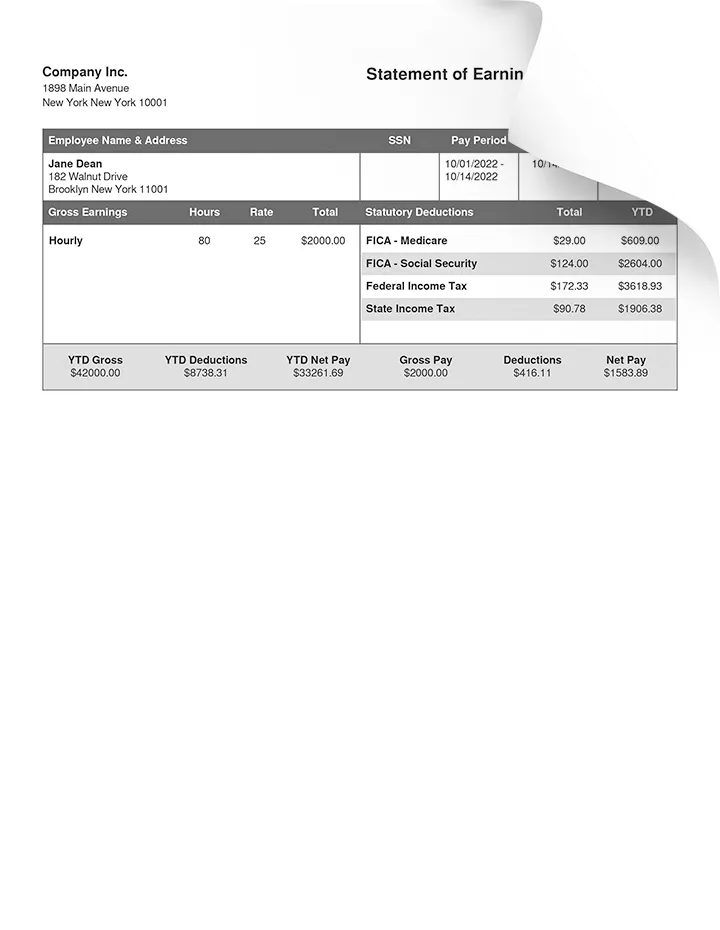
If you’re wondering how a check stub looks, it usually includes:
- Your name and employer’s name
- Pay period and payment date
- Gross pay, tax deductions, and net pay
- Year-to-date (YTD) totals
Here’s a simple example of what a pay stub looks like:
| Description | Amount |
|---|---|
| Gross Pay | $3,000.00 |
| Federal Tax | -$450.00 |
| State Tax | -$120.00 |
| Social Security | -$186.00 |
| Net Pay | $2,244.00 |
Every company’s pay stub may look a little different, but the format is generally similar.
💻 Creating a Pay Stub Online
Today, you don’t have to wait for HR or payroll departments to issue paper pay stubs. You can quickly make paycheck stubs online using tools like the PhcWorkHub Pay Stub Generator.
Just fill in your:
- Name or company name
- Income details (hourly or salary)
- Deductions and tax info
- Pay period and date
- Other information
Then click “Generate Pay Stub” — and your professional payment stub will be ready to download or print in seconds.

Pay Stub for Self-Employed Workers
If you’re self-employed or a freelancer, you might not get traditional pay stubs from an employer.
But that doesn’t mean you can’t have one!
With an online pay stub generator, you can easily create pay stubs for self-employed individuals to:
- Show income proof for clients or banks
- Track your own payments
- Maintain clean financial records
PHCWorkHub makes it simple — just input your business name, earnings, and deductions, and instantly download your self-employed pay stub.
🧰 Edit or Customize Your Pay Stub
Need to make quick changes to your pay stub? Use a pay stub editor to:
- Correct employer or employee info
- Adjust deductions or hours worked
- Add or remove earning types
With PHCWorkHub’s pay stub editor, you can create, edit, and regenerate check stubs with just a few clicks.
⚡ The Best Pay Stub & Check Stub Generators Online
If you’re searching for:
- Paycheck stub generator
- Check stub generator
- Pay stub generator
- Pay stubs creator
- Payment stub creator
… PhcWorkHub has you covered.
Our check stubs generator is fast, accurate, and secure — perfect for both employers and self-employed workers. Whether you need one stub or a hundred, you can make them instantly and download them as PDFs.
🏪 Example: Dollar General Pay Stub
One of the most common searches online is “Dollar General pay stub.”
If you work (or worked) at Dollar General and need to access or recreate your pay stub, you can use PhcWorkHub’s pay stub generator to quickly make a copy for your records.
Just input your pay details and employer info — and generate a professional-looking Dollar General pay stub instantly.
🚀 Why Use PhcWorkHub’s Pay Stub Generator?
✅ Instant digital pay stubs in minutes
✅ Accurate tax and deduction calculations
✅ Secure and private processing
✅ Download or print anytime
✅ Affordable pricing
Whether you need check stubs for employees, freelancer income proof, or replacement paystubs, PhcWorkHub makes it easy.
Final Thoughts
Understanding what a pay stub is and how it works helps you stay in control of your income and records.
With modern tools like the PhcWorkHub Pay Stub Generator, creating professional paycheck stubs online has never been faster or simpler.
👉 Ready to make your pay stub?
Visit PHCWorkHub.com today and generate your custom pay stub in minutes!