
Paycheck stubs are meant to give you a clear snapshot of your earnings for each pay period — yet for many people, they can feel confusing. The small abbreviations, numbers, and codes often leave employees wondering how their final net pay is calculated.
These short entries are known as paycheck deduction codes, and they exist to show exactly how your gross pay becomes your net pay. They outline every deduction, from taxes to benefits, so you know precisely where your money is going.
In this PHCWorkHub guide, we’ll break down what these deduction codes mean, how to read them, how to confirm accuracy, and how a digital check stub generator can automatically apply the correct calculations for you.
What Are Paycheck Deduction Codes?
When you review your pay stubs, you’ll notice lines labeled with brief abbreviations. These codes represent categories of taxes, benefits, and withholding amounts that contribute to your final take-home pay.
Because pay stubs must fit a lot of information on a single page, these abbreviations keep things compact and organized. Before calculating deductions, make sure your basic pay stub details are correct.
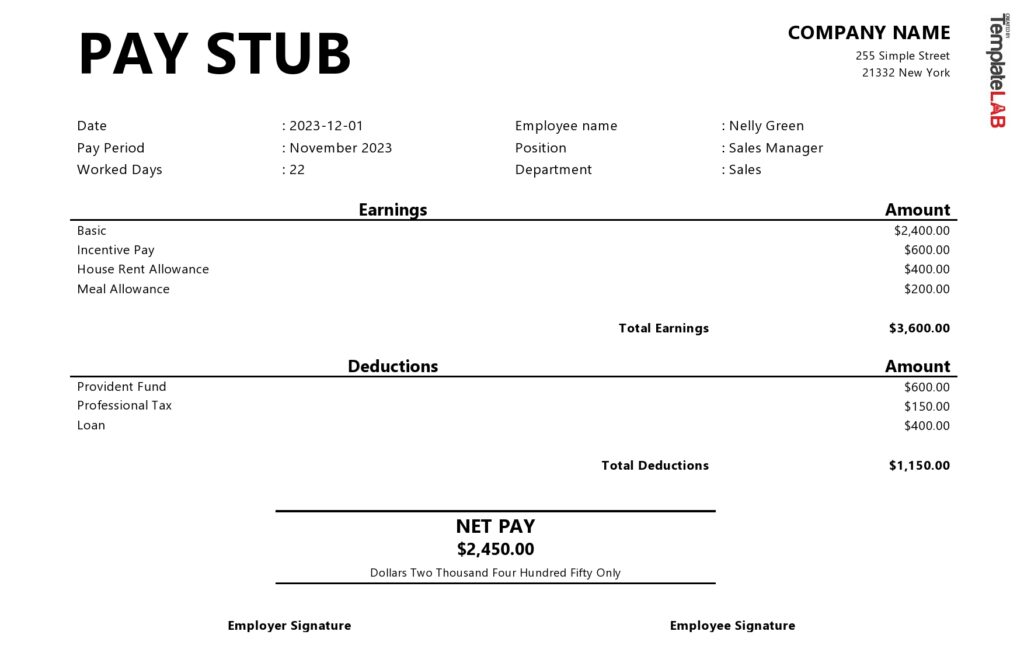
A properly prepared pay stub will show:
- Your employer’s name and address
- Your pay period and pay date
- Total hours worked and wage rate
- Gross earnings, deductions, and taxes
- Year-to-date totals
- Final net pay amount
Accurate payroll records help you, your employer, and any accountant verify your earnings and deductions correctly.
How To Verify Your Deductions on a Pay Stub
Creating reliable paystubs means reviewing each detail carefully. Here’s a simple process you can follow:
- Check employee details – Make sure your name and employee ID are correct.
- Confirm the pay period – Deduction amounts depend on accurate dates.
- Verify hours and rate if you are paid hourly or earn overtime.
- Review gross earnings – This is your total before deductions.
- Go line-by-line through deduction codes to make sure amounts match what you expect.
- Check year-to-date totals for consistency.
- Review net pay and ensure it matches the deduction calculations.
If you run into an unfamiliar code, check your company’s payroll portal or speak with HR.
Common Deduction Codes and What They Mean
Below is a breakdown of the most common paycheck deduction codes you’ll see:
| Code | Full Term | Meaning |
|---|---|---|
| FED / FIT | Federal Income Tax | Federal tax withheld from your paycheck |
| STATE / SIT | State Income Tax | State tax withholding |
| FICA / SS | Social Security | Social Security tax withheld |
| MED | Medicare | Medicare tax withholding |
| 401K / RET | Retirement Plans | Employee retirement contributions |
| FSA / HSA | Flexible or Health Savings Account | Pre-tax contributions for medical use |
| INS / MED INS | Insurance | Deductions for health, dental, or vision insurance |
| GARN | Garnishment | Court-ordered deductions |
| OT | Overtime | Extra earnings beyond regular hours |
| BONUS | Bonus Pay | One-time or incentive-based earnings |
| NET PAY | Net Pay | The amount you actually take home |
Different companies may use variations of these codes or add custom ones.
Deduction Codes for Social Security, Medicare, and FICA
Social Security and Medicare are required under the Federal Insurance Contributions Act (FICA). You may see any of these codes:
- SS, FICA, OASDI – Employee share of Social Security
- MED – Employee share of Medicare
These deductions are federally required and are important for retirement and medical benefits later in life.
Deduction Codes for Federal Income Tax and State Taxes
Your pay stub will typically list federal income taxes as:
- FED
- FIT
- FITW
Your state income tax will appear separately and may be abbreviated using your state’s initials — for example, CA SIT or OH ST TX.
Deduction Codes for Benefits, Insurance, and Retirement
Benefits often make up a significant part of payroll deductions. Here are examples of how they may appear:
- MED INS / INS / HEALTH – Health, medical, or vision insurance
- DEN or DENT – Dental insurance
- 401K / RET – Retirement plan contributions
- FSA or HSA – Pre-tax healthcare accounts
Employer-paid benefits may also show on your stub, but they do not reduce your pay.
What Are Pre-Tax and Post-Tax Deductions?
There are two types of deductions on a pay stub:
Pre-Tax Deductions
These reduce your taxable income before taxes are calculated:
- 401(k)
- Health insurance
- FSA/HSA contributions
Post-Tax Deductions
These come out after taxes and include items like:
- Garnishments
- Certain insurance plans
- Union dues (in some cases)
Understanding the difference helps you anticipate your take-home pay and tax impact.
Common Deduction Code Mistakes and How To Correct Them
Even with digital payroll systems, errors can occur.
1. Wrong Code Used
A deduction may be categorized incorrectly, such as using a benefit code instead of a tax code.
Fix: Ask payroll to review the code and reissue an updated pay stub.
2. Incorrect Tax Withholding Code
The amount may not match your W-4 selections.
Fix: Confirm that payroll used your latest W-4 and current tax tables.
3. Garnishment Code Errors
Applying garnishments late or under the wrong period can cause legal issues.
Fix: Confirm that payroll has the correct court order and request a written breakdown.
4. Duplicate Codes
Sometimes a deduction is mistakenly applied twice.
Fix: Trace the duplicate and request a corrected stub.
5. Internal or Custom Codes
Some companies use special internal codes that aren’t universally known.
Fix: Check onboarding paperwork or request HR clarification.
6. Outdated Tax Tables
Old payroll software may calculate taxes incorrectly.
Fix: Request a payroll recalculation using updated tax tables.

To Sum It Up
Paycheck deduction codes are essential for understanding your earnings and ensuring payroll accuracy. Knowing what these codes mean helps you catch mistakes early, avoid compliance issues, and understand exactly how your wages are processed.
Using a reliable pay stub generator like PHCWorkHub’s digital check stub creator ensures accurate, compliant, and error-free deductions every time — perfect for employees, freelancers, and small businesses.
If you want effortless, accurate stubs, generate your next pay stub on PHCWorkHub in just minutes.